An interview is one of those moments where you don’t want tech issues deciding anything for you.
And if you’ve been relying on your phone as a webcam, you already know the trade-offs: great image quality, but battery anxiety, overheating risk, WiFi instability, and awkward audio through a built-in mic that was never meant for 2-hour conversations.
That Reddit-style situation is actually really common:
You don’t need “streamer gear.”
You just need something stable, clear, and professional that won’t fail mid-interview.
So let’s break this down properly—what actually matters for interviews, and which webcams are worth considering under ~$150.
1. AV Access 4K Conference Room Camera

👉 Best for: Premium interview presence + group-quality clarity
This is the most “conference room style” webcam in this list, and it behaves more like a professional meeting camera than a basic laptop accessory.
What stands out:
- Wide 120° field of view (good framing flexibility)
- Auto framing + presenter tracking (keeps you centered)
- Dual noise-canceling microphones (important for echo control)
- ePTZ zoom control (lets you adjust framing without moving camera)
- Designed for Zoom/Teams-style interviews
Why it’s strong for your situation:
For a multi-hour interview, stability and consistent framing matter more than cinematic image quality. This camera is built for long calls, not short streaming sessions.
Downside:
It’s slightly “conference room” overkill if you only need a simple setup—but it’s the most controlled experience here.

2. Logitech C920S

👉 Best for: Safe, proven interview standard
This is the webcam that basically defined the remote interview era.
Why people still use it:
- Very consistent 1080p image
- Natural skin tones (not overly processed)
- Plug-and-play reliability
- Decent built-in mic for calls
- Works instantly with Zoom, Teams, Google Meet
It doesn’t try to be fancy, it just works.
Why it’s ideal for interviews:
Interviews don’t reward gimmicks. This camera is predictable, stable, and widely trusted in professional settings.
Downside:
Mic is “okay,” not amazing—but still clear enough for interviews in quiet rooms.

3. Logitech C922

👉 Best for: Slightly sharper image + better motion handling
Think of this as the C920’s slightly upgraded sibling.
What improves:
- Better motion clarity (useful if you move slightly)
- Slightly improved low-light performance
- 720p at higher frame rate for smoother video
- Still very stable and widely supported
For interviews:
This gives a slightly more polished look without making you look “overprocessed.”
Downside:
Mic quality is similar to C920—good, but not exceptional.

4. Anker PowerConf C200
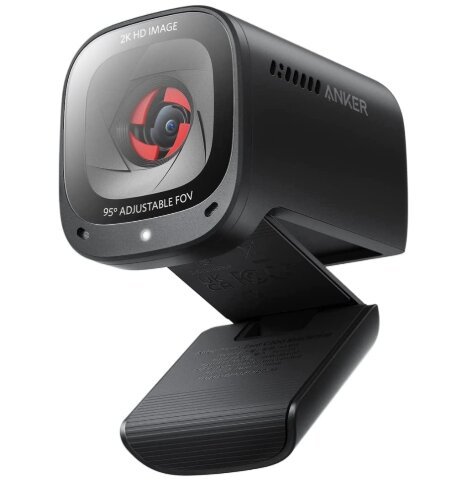
👉 Best budget option with surprisingly strong performance
This one is popular because it quietly overperforms for its price.
Why it stands out:
- 2K resolution (sharper than standard 1080p)
- Strong noise-reduction microphones
- Adjustable field of view (useful for framing)
- Good low-light handling
For interviews:
It actually gives you a slightly more modern “sharp” look compared to older Logitech models.
Downside:
Color tuning can feel a bit inconsistent depending on lighting.
Still, for budget setups, it’s one of the best value picks.

5. Elgato Facecam

👉 Best for image quality (but requires external mic ideally)
This is closer to a “creator webcam” than a standard meeting device.
What it does well:
- Very clean, natural image quality
- Strong color accuracy (less artificial processing)
- High-quality Sony sensor
- Great for well-lit environments
Why it’s on the list:
If your priority is looking visually sharp and professional, this is excellent.
Important downside:
It has no built-in mic in many configurations, so you may need a separate microphone if you choose it.

What Actually Matters for an Interview
Most people overthink resolution and ignore the real problems.
For interviews, the priorities are:
1. Stable connection (USB plug-in > phone streaming)
You don’t want battery or WiFi risk during a critical moment.
2. Good natural color + face clarity
You want to look like yourself, not overexposed or washed out.
3. Reliable autofocus + exposure control
So you’re not constantly adjusting lighting mid-interview.
4. Decent built-in microphones (or usable dual mics)
Not studio-level, but clear enough to avoid echo or “tinny” sound.
5. Proper mounting flexibility
Especially important for low monitor setups (bottom-mounted angle facing upward like you mentioned).
Why Phone-as-a-Webcam Sounds Good (But Isn’t Ideal Here)
Phones actually give great image quality—but they introduce problems people underestimate:
- Battery drain over long calls
- Overheating risk after 60–120 minutes
- Notifications or interruptions
- WiFi dropouts or app crashes
- Audio mismatch (mic not optimized for conferencing)
For something like a medical school interview, reliability matters more than image “pop.”
A dedicated webcam removes those variables completely.
So What’s Actually Best for YOUR Interview?
- Safest overall: Logitech C920S
- Best balance of modern + budget: Anker C200
- Best “professional room” feel: AV Access conference-style camera
- Best image quality (if you add mic): Elgato Facecam
- Best upgraded Logitech option: C922
Simple Setup Tips (This matters more than the webcam)
Even a $50 webcam can look like a $200 setup if you do this right:
- Place webcam at eye level (top of monitor or bottom angled upward like you want)
- Face a window or soft light source (not behind you)
- Avoid overhead lighting directly above your head
- Use a plain background (no clutter or movement)
- Do a 5-minute Zoom test before the interview day
Bottom Line
For all interviews, you’re not trying to impress with specs—you’re trying to eliminate risk.
A stable USB webcam removes battery anxiety, improves audio consistency, and gives you predictable video quality for the full 2 hours.
If you want the simplest answer:
👉 Logitech C920S is still the safest “just works” option
👉 Anker C200 is the best budget upgrade
👉 AV Access-style conference cams are best if you want a more polished “room presence”
Disclaimer:
This post may contain affiliate links, which means that I may receive a small commission, at no cost to you, if you make a purchase through a link!